Beam Conditioning Unit (BCU)
| Warning |
|---|
|
The BCU must be switched on when the Versatile Laser Engine is emitting, otherwise serious damage will occur to the BCU due to the power of the Versatile Laser Engine laser radiation. It is important that the BCU interlock connector is wired to the interlock system correctly as this will stop the Versatile Laser Engine emitting to protect the BCU. |
The BCU homogenizes the laser beam output from the laser engine multimode fibre to provide uniform illumination of the sample. It is coupled to the laser source through a multimode fibre with fibre optic couplings (FC/ APC). The output fibre (FC/APC) is of the armoured type and not removable and connects to the Versatile Laser Engine. The multimode output fibre has a square core cross section which is ideal for use with square format cameras e.g. iXon Ultra 897 or Zyla 4.2.
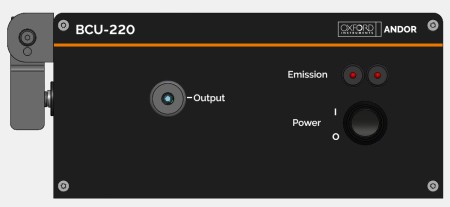
The beam conditioning unit (BCU).
Emission LEDs
Emission LEDs on the front panel of the BCU show the status of the unit. When these are lit, laser emission is possible. Please note there are two LEDs to provide redundancy for the laser emission status.
On/Off Switch
A toggle switch is located on the front panel of the BCU. This controls the power to the unit.

Power Input
A 2.1 mm input connector is used to provide DC power from the power supply unit to the BCU. Do not use any other power supply than the one supplied. See Power Supply Information.
Fibre Lock
A locking mechanism is provided on the rear panel of the BCU that closes over the input multimode fibre coming from the laser source. This fibre lock must be put in place at time of installation by the installer.
| Warning |
|---|
|
Never remove the fibre lock when in operation. |
The cable should only be disconnected by qualified service personnel. A tool is required to open the locking mechanism once closed.
Fibre Input
A multimode fibre is provided to connect the laser source to the BCU. This connection is made to the fibre input connection on the rear panel of the BCU using the FC connector provided and locked in place with the fibre lock (see Fibre Lock description above).